
How to Advanced Search and Filtering on TendersGo
The Ultimate Global Intelligence Engine for Tenders and Procurement Opportunities
Never Miss a Tender Again: Deep Advanced Search & Filters Built for Professionals
At TendersGo, we are committed to helping you find the right tenders with speed and precision. On this page, you will learn step by step how to use our advanced search and filtering tools to quickly locate the opportunities that matter to you.
With intelligent filters, advanced search options, and a user-friendly interface, you can quickly refine thousands of results and find exactly the tenders you need. With TendersGo, accessing the right opportunities to grow your business is simpler, faster, and more precise than ever. Ready to begin your advanced search?
How to Enter Keywords for Advanced Filtering
Keywords Used in Search and Filtering
If a Continent or Region Has Been Selected
Total Matching Results
Applied Search and Filtering Parameters
Save Search and Filter Parameters as an Email Alert

.
After you enter your keyword(s), you can choose how the system should search for them:
-
Mentions: Shows tenders where your keyword appears anywhere in the text.
-
Exact Match: Shows tenders where the exact phrase you typed appears exactly as written.
-
Any: Shows tenders that contain any of the keywords or phrases you entered.
○ Mentions
Returns results containing all the words you searched for. For instance, searching 'hospital management system' will return results that include 'hospital', 'management', and 'system'. The presence of both words is essential, either adjacent or dispersed throughout the text. Typically, when conducting a tender search focused on a specific topic, you can utilize a combination of these words as desired.
○ Exact Match
Ensures an exact match of the word or phrase. For example, the phrase 'public procurement' must appear exactly as specified. It focuses on finding the exact words as they are written within the text. This method is commonly used to search for technical terms or exact phrases of two or three words, as they appear.
○ Any
Ensures that any word from the phrase matches. For example, either 'public' or 'procurement' must appear. The objective here is to list procurement opportunities in fields of interest using keyword groups. At least one of the specified words must appear within the text, and if you've listed 10 words, any combination of two, three, or all 10 words may appear in the text. The aim is to list results containing any of the specified words present, irrespective of which ones exactly, in order to generate comprehensive results. This method is typically employed to maximize result listings.
The world’s most powerful global tender search engine, bringing you unmatched coverage and opportunities in every country and every language – with each notice available both in its original language and in a standardized English version. Search in English or in the original language, the choice is yours.
TendersGo aggregates and presents not only global tenders, but also local, national, federal, regional, city, and municipal opportunities from hundreds of thousands of sources worldwide. As the most comprehensive tender search engine, it covers procurement notices in every country and in every language.
Each notice is available in its original language and in a standardized English version, allowing you to search in English or directly in the local language. TendersGo is currently available in 145 languages and continues to expand, with new sources and languages added daily. When performing searches and applying filters, make sure to select the appropriate language to effectively discover local tenders.
.
Search for the phrase exactly as written using Exact Match
Keywords to be used in search and filtering
Total Matching Results
Choose which search method you want to use

View how many matching results you have in each country, and exclude any countries you are not interested in from the results. - " Exact Match "
💡 Sample Information Note
In the sample search and filtering shown in the image, the keyword “diesel generator” has been searched across all countries in the Europe region, and the method “Exact Match” has been selected. This means that the search engine will only return results where the phrase “diesel generator” appears exactly as you typed it, in the same order and with the same spacing inside the text. For this reason, you should use the Exact Match method carefully, as it may exclude results where the words appear in a different order or with additional words between them.
Search for the phrase exactly as written using Any
Choose which search method you want to use
Keywords to be used in search and filtering
Total Matching Results

View how many matching results you have in each country, and exclude any countries you are not interested in from the results. - " Any "
💡 Sample Information Note
In the sample search and filtering shown in the image, the keyword “diesel generator” has been searched across all countries in the Europe region, and the method “Any” has been selected. This means that the search engine will return results where either “diesel” or “generator” (or both) appear anywhere in the text, regardless of their order or position. Because the Any method is broader and more flexible, it can significantly increase the number of matching results. This is useful when you do not want to miss potential opportunities, but you may need to refine your filters further (for example by country, sector, organization, or value) to narrow down the results to the most relevant tenders.
You can run as many searches and apply as many filters as you need, because TendersGo provides unlimited access to all search and filtering features.
TendersGo is a unique global tender search engine that operates in every language and aggregates data from the widest range and highest number of sources worldwide. As the largest platform of its kind, TendersGo ensures that companies of all sizes have equal access to the most up-to-date tender opportunities across the globe. Unlike many other platforms, it supports fair competition, transparent pricing, and unrestricted access to opportunities, helping businesses strengthen, grow, and expand into new markets.
Advanced Tender Search & Filtering – Screen Guide
Enter your main keywords here (e.g. diesel generators, scada system). Each keyword group is separated by a comma and included in the same combined results list.

Search Method Mentions / Exact Match / Any
Saves your current keywords and all filters as an email alert so you are automatically notified when new matching tenders are published.
Total Matching Results
Shows the countries where matching tenders are found, together with the number of tenders per country. Click a country to include or exclude it from your results.
💡 Sample Information Note
In the sample search and filtering shown in the image, the keywords “diesel generators, scada system” have been searched across all countries, and the method “Mentions” has been selected. This means that the search engine returns a single combined results list that includes any tender where either “diesel generators” or “scada system” (or both) is mentioned anywhere in the tender title or details.
Because the Mentions method is broad and flexible, it helps you capture all tenders that refer to these topics, even if they appear in different parts of the text. If the number of results is high, you can then refine them further by applying additional filters such as country, region, sector, organization, language, or value range to focus on the most relevant opportunities. If you want to combine multiple keyword groups within a single search and filter setup, you must separate each keyword group with a comma (,).
.
TendersGo is the world’s largest search engine for tenders and contract opportunities.
TendersGo delivers unmatched, highly detailed search and filtering capabilities. Since 2016, it has been continuously researched, developed, and refined by analyzing tender and procurement portals from countries around the world, with improvements being made every day. As a result, TendersGo stands as the world’s largest search engine for tender and contract opportunities, designed to provide the best possible user experience with powerful, professional-grade solutions.
Use Sector and Industry Filters for More Detailed Filtering
Enter one or more keyword groups, for example: “diesel generators, scada system”. If you want to combine multiple keyword groups in a single search, you must separate each group with a comma (,). All matching tenders for any of these groups are shown in one combined results list.
Total Matching Results
Saves your current keywords and all filters as an email alert so you are automatically notified when new matching tenders are published.
The Exact Match option is selected. This means the search engine only returns tenders where the keyword group appears exactly as written, in the same order and with the same spacing (for example, the phrase “diesel generators” must appear exactly like this in the title or details).

The Countries Found in Results section lists all countries where matching tenders were found, together with the number of tenders per country. You can click on any country to include or exclude it from your results and focus on your priority markets.
💡 Sample Information Note
In the sample search and filtering shown in the image, the keywords “diesel generators, scada system” have been searched across all countries, and the method “Exact Match” has been selected while the English view and Include English Version This means that the search engine returns a single combined results list that includes any tender where either “diesel generators” or “scada system” (or both) appears exactly as written Because the Exact Match method is stricter, it helps you focus on tenders that use the precise phrases you entered, but it may exclude results where additional words are inserted or the wording is slightly different. If the number of results is still high, you can further narrow them down by applying additional filters such as country, region, sector, organization, language, or value range to focus on the most relevant opportunities. If you want to combine multiple keyword groups within a single search and filter setup, you must separate each keyword group with a comma (,).
.
Search Without Limits: Advanced Tender Filtering Powered by TendersGo
TendersGo provides the most comprehensive, fully unlimited search and filtering experience. You can run as many searches and apply as many filters as you need, without restrictions. In addition, you can save your preferred search settings and receive daily email alerts with the latest tender opportunities directly in your inbox. For premium members, the number of email alerts is completely unlimited.
Return Results that Contain Any of Your Keywords
Enter one or more keyword groups (e.g. “diesel generators, scada system”) separated by commas. All tenders matching any of these groups are shown in a single combined results list.
Total Matching Results
Saves your current search and filters as an email alert so you are automatically notified when new matching tenders are published.
Search Method Mentions / Exact Match / Any

Shows all countries with matching tenders and the number of tenders per country. Click any country to include or exclude it and focus on your priority markets.
💡 Sample Information Note
In the sample screen, the keywords “diesel generator, scada system” are entered in the Search field and the match method “Any” is selected. This means the system returns a single combined results list containing all tenders where either of these keyword groups (or both) appear in the title or details. The Include English Version option is turned on, so every matching tender is shown with a standardized English text, even if it was originally published in another language.
At the top, the bar “Total 158,354 tenders found. 3,000 tenders are listing.” shows how many tenders match your criteria in total and how many are currently displayed. The Countries Found in Results section lists each country with the number of matching tenders, and “Show More (182 more)” lets you expand the list. You can then click Add Alert to save this exact search and all filteany of these keywords will be sent to your inbox automatically.
.
Automatic Daily Alerts for Your Custom Searches
You can easily turn any set of search filters and options into a daily email alert, delivering the latest matching opportunities straight to your inbox. Unlike other platforms, TendersGo offers this service with truly unlimited access. Every email alert you create is also saved as a profile search, allowing you to open it directly from your profile page without reapplying filters each time. This dual structure makes tracking your target tenders both highly efficient and exceptionally convenient.
Filtering by Single Organizations or Organization Groups
From the dropdown list, choose the exact organization you want to follow (for example, a specific Ministry of Energy), then apply the filter.
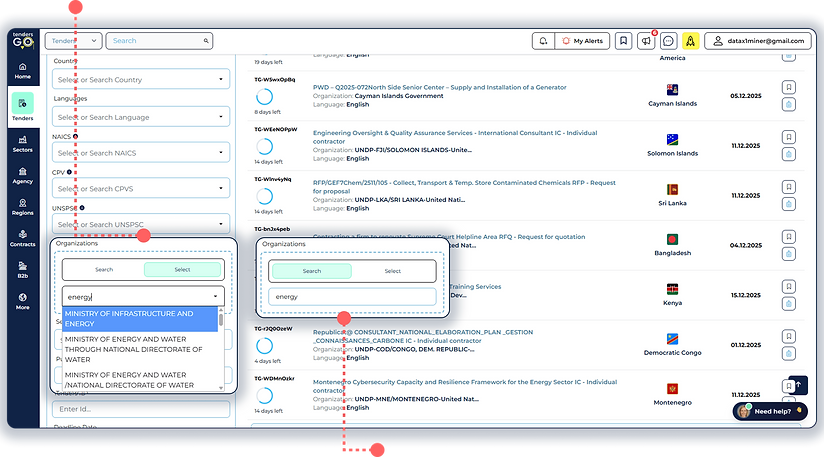
Type a keyword (e.g. energy) in the Organizations field to search among all buyer organizations that match this term.
💡 Sample Information Note
In the sample screen shown in the image, the Organizations filter is used to narrow the results to specific buyers. By typing a keyword such as “energy” in the Organizations field, TendersGo searches all buyer names and displays a list of matching institutions (for example, different Ministries of Energy and related agencies). You can then select one or more organizations from this list and apply the filter so that the results table shows only tenders published by the selected buyers, while still respecting all other filters such as country, language, NAICS, CPV, or UNSPSC.
If you keep the Organizations filter empty, the search remains general, and results will include tenders from all buyers that meet your other criteria. When you add one or more organizations, the scope becomes focused, turning the same search into a targeted view of tenders issued only by your priority institutions (e.g. all “energy” ministries worldwide), which is ideal for account-based or buyer-focused business development.
.
Targeting Multiple Organizations in a Single Keyword-Based Search
In the Active Filters bar, the chip Organization Name: Energy, steel confirms that your search is now limited to organizations whose names match any of these reference keywords. All results on the page are filtered according to this combined organization basket.
Organization Keyword Basket
In the Organizations field, enter one or more reference keywords (for example: energy, steel). Each keyword acts as a “bucket” and includes all organizations whose names contain that term. Separate multiple keywords with commas to target several organization groups in a single search.
.png)
Results from All Matching Organizations; The tender list displays only notices published by organizations whose names include Energy or Steel (for example: national energy agencies, rail energy companies, steel authorities, etc.). Different buyers are grouped into one unified result set based on your organization keywords.
💡 Sample Information Note
In the sample screen, the Organizations filter is used to target a basket of buyers using reference keywords. In the Organizations field, the user has entered energy, steel. TendersGo scans all buyer names and automatically includes every organization whose name contains Energy or Steel (for example, energy ministries, rail energy companies, steel authorities, etc.). The results table then shows tenders published by all organizations that match any of these keywords.
If you leave the Organizations field empty, the search remains general and includes tenders from every buyer that matches your other criteria. When you enter one or more organization keywords, the same search becomes focused, turning it into a consolidated view of tenders issued only by your priority institution groups (for example, all “energy”-related organizations worldwide) within a single search.
.
Create a Tender Email Alert from Your Search
Search Keywords & Match Method
Enter one or more keyword groups in the Search field (for example: "diesel generators";"scada system";"solar energy").

Enter a clear Alert Name (for example: “Europe – diesel generators & solar energy”) and click Add Tender Alert.
💡 Sample Information Note
In the sample alert setup shown in the image, the keyword groups "diesel generators", "scada system", and "solar energy" are entered in the Search field, and the match method “Any” is selected while the Region is set to Europe. This means the system will create a single tender alert that monitors all European tenders and sends you an email whenever any of these keyword groups appears in the tender title or details. The Any method is broader and more flexible, helping you capture all opportunities related to any of the selected topics within your chosen region. If you want to combine multiple keyword groups in a single alert, enter each group separately as shown in the example, so all tenders matching any of them are included in the same email notification.
.
Find and Follow Every Tender, in Any Language, with TendersGo.
TendersGo collects data from hundreds of thousands of sources in every country and language, adding new sources every day to deliver the latest opportunities to its users. This makes TendersGo the world’s largest search engine for tenders and contract opportunities, supported by powerful advanced filtering and unlimited email alert capabilities. TendersGo also uniquely provides English translations for millions of tenders originally published in other languages. Users can view both the original local-language version and a standardized English version, and can search and filter in either English or the local language. This exclusive feature allows users to easily track and understand local tender opportunities, even in markets where they do not speak the language.
Manage All Your Tender Email Alerts in One Place
Each row shows an alert you have created, including its name (e.g. Europe Energy Alert) and the date it was created.
The Current column displays how many new results match this alert (e.g. 254 New). Click View to open the latest tenders for that alert.
Click RSS to generate an RSS feed for this alert so you can follow new tenders in your own RSS reader.
Use the list on the left (Tender Alerts, Contract Alerts, Organization Alerts, Fair Alerts, Project News Alerts, Trade Alerts, etc.) to switch between different types of alerts you have created.

Download as Excel exports the latest results for this alert into an Excel file. Note: each Excel export is limited to the most recent 500 records.
The icons on the far right let you edit the alert settings or delete the alert completely if you no longer want to receive notifications.
💡 Sample Information Note
In the sample screen shown in the image, the previously created alert “Europe Energy Alert” is listed under Tender Alerts. This alert continuously monitors tenders that match the saved search criteria and shows how many new results are currently available (for example, 254 New). You can click View to open the latest matching tenders, use the RSS button to follow this alert in an RSS reader, or click Download as Excel to export the most recent 500 records. From this page, you can also manage all your alerts by selecting different alert categories on the left and editing or deleting any alert using the action icons on the right.
.
Instantly Understand Tenders with AI-Powered Summaries
No More Clicking Into Details — Stay on the Listing Page!
TendersGo now includes a cutting-edge AI feature that dramatically speeds up your search process: AI Tender Summary Assistant. Instead of opening each tender’s detail page, you can now simply click the AI icon on the listing page to get a smart, auto-generated summary. This summary provides key information — such as what is being procured, the issuing authority, the deadline, and any critical submission notes — directly in a pop-up.
.
View the summary prepared by the AI assistant in the pop-up window.
Click the button for an instant AI-generated summary.

If you want to view all the details, click to access the full tender page.
Faster browsing, Less time spent opening and closing tabs.
Powered by advanced AI models, summaries are tailored to help you quickly decide if a tender is relevant — all without leaving your search results.
Exclude Countries from Your Tender Search Results
TendersGo Advanced Filters showing how to exclude selected countries from global tender search results.
Remove countries outside your target markets and focus your search on the most relevant tender opportunities.
Countries Found in Results View all countries with matching tenders and the number of results available in each country.

Exclude Countries Select one or more countries you do not want to include, then click Apply Filter to remove their tenders from the results.
How to Cancel Auto-Renewal for Your TendersGo Premium Membership
Open the dropdown menu and select “Manage Subscription.”
Canceling auto-renewal does not affect your current subscription period. You will continue to enjoy full premium access until the expiration date. It only prevents the system from charging you again at the end of the billing cycle. You will be redirected to the Subscription Management page; From here, you can view your active membership details and disable the auto-renewal option.
This option will take you to the page where you can manage your billing and subscription settings.

You Focus on Bidding, TendersGo Delivers the Opportunities
+220 Countries, 29 Regions
All the World’s Tenders. One Intelligent Portal.
Tired of missing valuable business opportunities across the globe ? With TendersGo, you can monitor tenders from any country and in any language through a single, comprehensive platform. Track every opportunity that matters to you in one place, instead of jumping between dozens of portals.
Unlocking Global Opportunities, One Tender at a Time
In today’s global economy, winning the right tenders and building strong business relationships is no longer optional; it is a strategic necessity. Companies, NGOs, and public institutions of all sizes need a single, reliable place where they can discover opportunities, publish their own tenders, connect with suppliers, and monitor the market in real time.
This is exactly what TendersGo delivers.
TendersGo is the world’s most comprehensive tender, contract, and B2B opportunity platform. It aggregates the latest procurement data from more than 220 countries, in over 130 languages, covering public and private sector portals, development banks, aid organizations, utilities, and corporate buyers. On top of that, it combines advanced search, powerful AI, publishing modules, and a global B2B marketplace into one integrated system.
Unmatched Global & Multilingual Coverage
TendersGo collects data from hundreds of thousands of sources around the world and adds new sources daily. Whether the opportunity comes from a national procurement portal, a city municipality, a ministry, a donor agency, a utility company, or a private buyer, TendersGo brings it into a single, unified platform.
Every notice is available in its original language and, wherever possible, in a standardized English version. This means you can search and filter in English while still accessing local tenders published in any language, or you can work directly in the original language if you prefer. This unique multilingual structure allows you to expand into new markets even where you do not speak the local language.
Extensive Tender & Contract Archive
Beyond current opportunities, TendersGo maintains a large and continuously growing tender and contract archive. This archive allows you to:
-
Study historical procurement trends
-
Analyze buyer behavior and purchasing patterns
-
Identify recurring contracts and long-term framework agreements
-
Benchmark competitors and potential partners
By understanding who won which contracts, under which conditions, and in which markets, you can build stronger bidding strategies and enter negotiations with real market intelligence instead of assumptions.
Advanced Search Engine & Detailed Filtering
At the heart of TendersGo is a powerful advanced search engine designed specifically for procurement data. You can refine results using:
-
Sectors & industries with CPV, UNSPSC, NAICS and other code systems
-
Regions, continents, and countries
-
Organizations, agencies, and specific buyers
-
Publication dates, deadlines, contract values and currencies
-
Languages and original vs English versions
-
Exact Match, Mentions, and Any keyword methods
-
Custom keyword groups in a single search
You can combine multiple keyword groups (for example, “diesel generators, SCADA system, solar energy”) and use different match methods to control how strictly the engine should search. This lets you move from broad market scanning to highly targeted opportunity hunting in a few clicks.
Custom Profiles & Unlimited Alerts
Once you have defined your ideal search, you do not need to repeat the process every day. TendersGo allows you to:
-
Save advanced search profiles with all keywords, filters, regions, sectors, organizations, and methods
-
Create unlimited email alerts based on these profiles
-
Receive daily notifications for tenders, contract awards, organizations, project news, trade fairs, and B2B trade requests
-
Every alert you create is also stored as a profile on your account, so you can open it directly from your profile page, adjust it, or run it instantly without rebuilding your filters. Premium members enjoy unlimited alerts, so they can follow as many markets, buyers, and topics as needed.
Tender & Contract Intelligence
TendersGo is not just a tender listing site; it is a tender and contract intelligence platform. In addition to tender notices, you can:
-
Search and filter contract awards
-
Track which companies are consistently winning certain types of contracts
-
Follow the tenders and awards of specific organizations and contractors
-
Build watchlists for buyers and suppliers that are strategically important to you
This gives you a clear picture of the competitive landscape, potential partners, and future opportunities, turning raw data into actionable intelligence.
Organization Module: Publish & Manage Your Own Tenders
TendersGo does not only serve suppliers; it also empowers organizations and buyers through its Organization Module. With this module, public institutions, NGOs, donors, and private companies can:
-
Publish tenders and RFPs through their own dedicated page
-
Collect bids with full bidder profiles and documents
-
Host tender files and received bids securely
-
Track views, downloads, and engagement
-
Edit, extend, or close tenders with full control
Standard packages allow organizations to publish a large number of tenders per year with full bid collection, and there is an upgrade option for unlimited tender publishing. Technology, infrastructure, and global visibility are provided by TendersGo, so organizations can benefit from a professional tender platform without the cost of building and maintaining their own system.
Company Module: Bidding, Profiles & Visibility
On the supplier side, the Company Module allows contractors, manufacturers, service providers, and exporters to:
-
Create a detailed company profile with documents, certifications, and references
-
Submit bids to tenders published through TendersGo
-
Be listed as a supplier / contractor in the TendersGo ecosystem
-
Publish B2B announcements such as import, export, partnership, or service requests
-
Build a professional presence that buyers can discover and evaluate
This gives companies a combined environment where they can both find tenders and present themselves as credible, visible suppliers to buyers worldwide.
Integrated Global B2B Marketplace
TendersGo also includes a B2B Global Marketplace that complements the tender and contract ecosystem. Through this marketplace, companies can:
-
Open a virtual store and showcase products and services
-
Add images, technical information, HS codes, certifications, payment and delivery terms
-
Receive interest and requests directly from potential buyers around the world
-
Combine transactional tenders with long-term product visibility and branding
-
This transforms TendersGo from a pure tender search engine into a global trade and business development hub, connecting buyers and suppliers across traditional tender processes and open B2B trade.
AI-Powered Assistance & Smart Search
TendersGo leverages modern AI technologies to make complex searches and large data sets easier to handle. AI-powered features can help you:
-
Generate intelligent keyword sets for your sector
-
Summarize tenders without opening every detail page
-
Recommend daily tenders based on your previous behavior and filters
-
Assist new users in building effective search and filter strategies
This combination of structured filters and AI-driven intelligence allows both experienced tender professionals and newcomers to work faster and more accurately.
Cost-Effective, Professional-Grade Platform
All of these capabilities are delivered with transparent and highly competitive pricing, making TendersGo accessible not only to large corporations and institutions but also to SMEs and growing businesses. Few, if any, platforms combine:
-
Global coverage across 220+ countries
-
Multilingual support with original and English versions
-
Advanced tender and contract intelligence
-
Organization and Company Modules
-
B2B marketplace functions
-
Unlimited alerts and deep filtering
into a single, coherent solution at such a cost-effective level.
Why TendersGo?
-
All Opportunities in One Place
No more switching between dozens of national portals, donor sites, and private platforms. TendersGo consolidates them into one powerful interface. -
Save Time and Resources
Advanced filters, custom profiles, and unlimited alerts drastically reduce the time you spend searching, so you can focus on preparing strong bids and building relationships. -
Stay Ahead of the Competition
With both current tenders and deep archive data, you can make informed strategic decisions instead of reacting blindly to market changes. -
Empower Both Buyers and Suppliers
With dedicated modules for organizations and companies, TendersGo supports the entire procurement ecosystem, not just one side of it.
In the fast-moving world of global procurement and trade, having the right data and tools in a single, integrated platform can be the difference between leading the market and falling behind it. TendersGo provides that platform: a complete environment for discovering, publishing, tracking, and winning opportunities worldwide.
Do not limit your business to a handful of portals or a few countries.
Join TendersGo, and turn the entire world of tenders, contracts, and B2B trade into your opportunity pipeline.
